![become1_Logo_black.png]](https://help.become1.de/hs-fs/hubfs/become1_Logo_black.png?width=100&height=33&name=become1_Logo_black.png)
📍 How the region is determined
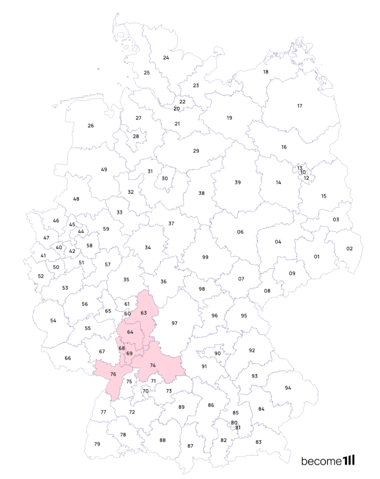
You choose your preferred region based on the first two digits of a ZIP code (e.g., your place of residence or work).
-
Central Area: All locations starting with these two digits.
-
Extended Area: Additionally, all directly adjacent two-digit ZIP code areas.
-
Example: If you choose "69" (Heidelberg), the card is valid in the entire 69... region as well as in the neighboring areas (e.g., 63, 64, 68, 74, 76).
🛒 Where can I use the Card?
Payment is only possible on-site (stationary retail) within your chosen region at all Mastercard acceptance points.
-
Not possible: Online purchases (E-commerce), bank transfers, cash withdrawals, or the purchase of foreign currencies.
-
No IBAN: The card does not have its own bank account.
⚠️ Important note on selection
Please consider your selection carefully: Once confirmed, the chosen ZIP code region cannot be changed (unless the balance is below €1 or the card has never been used).
🔍 ZIP Code Generator
Would you like to check in advance which areas are included in your preferred ZIP code? Click HERE for our ZIP code generator