-
🛠 Step-by-step guide
Follow these steps in your profile to request your card delivery:
- Log into the portal at app.become1.de.
- Click on the become.1 Card segment.
- Click on your existing virtual card.
- Scroll all the way to the bottom and click on the button Order a physical card.
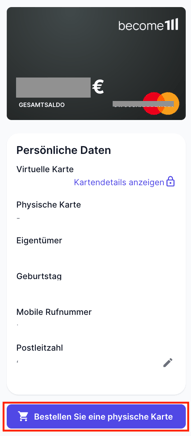
- Enter your preferred shipping address and confirm the process with the SMS code sent to your smartphone.
Congratulations: Your physical become.1 Card is now being printed and is on its way to you!
💡 Notes, tips & special cases
- Made a mistake with your address? If you notice a typo in your address right after placing the order, you can stop the shipment immediately. To do this, simply click the Cancel card button in your card view.
- Delivery time: The printing and postal delivery of your physical card usually takes a few business days. Until the card arrives in your mailbox, you can, of course, continue to use your virtual card as usual via Apple Pay or Google Pay.
📞 Still have questions?
If it doesn't work despite this guide, or if you have a special case, just send us a message at support@become1.de or write to us in the chat.
We are happy to help you – we usually get back to you within 48 hours on business days.
English
![become1_Logo_black.png]](https://help.become1.de/hs-fs/hubfs/become1_Logo_black.png?width=100&height=33&name=become1_Logo_black.png)