![become1_Logo_black.png]](https://help.become1.de/hs-fs/hubfs/become1_Logo_black.png?width=100&height=33&name=become1_Logo_black.png)
1. Forgotten password or incorrect login credentials
If you receive a message stating that your login credentials are incorrect, please first check the spelling of your username and password. If you can no longer remember your password, you can reset it at any time:
- Open the login page at app.become1.de
- Click on "Forgot password?" below the login fields.
- Enter your registered email address.
- Shortly after, you will receive a link via email to create a new password. Alternatively, you can use this direct link for password recovery
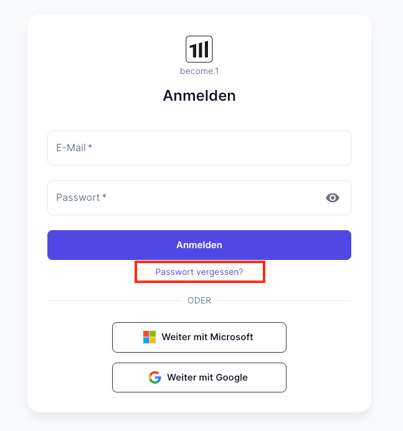
TIP: If you did not receive a password reset email, please check your spam folder.
2. Troubleshooting technical issues
Sometimes, outdated browser data (cache) or specific browser settings can prevent a successful login. In this case, please follow these steps in order:
- Use Incognito Mode: Open a private browsing window and try to log in there.
- Try a different browser: Attempt to log in using a different browser (e.g., switch from Google Chrome to Mozilla Firefox).
- Clear your cache manually: If the first two steps do not work, clear your browser's cache. You can find the official guides from the providers here:
3. Access after leaving the company
If you have left the company that provided you with access to become.1, the following regulation applies:
- Your access will remain active for approx. 4 weeks after your official departure date. During this time, you can log in as usual.
- Once this period has expired, your access will be automatically deactivated.
IMPORTANT: If you urgently need access to your data after the 4-week period has expired, please contact us directly via email at support@become1.de.
Still stuck?
Don't worry, we are here to help! If none of the steps above solve the issue, please send us a short message describing the error (ideally including a screenshot of the error message) to support@become1.de.