![become1_Logo_black.png]](https://help.become1.de/hs-fs/hubfs/become1_Logo_black.png?width=100&height=33&name=become1_Logo_black.png)
The become.1 platform records all monthly changes and provides them in a variable data file. You can easily import this file into your payroll accounting system.
Below you will also find a step-by-step guide on how to set things up initially.
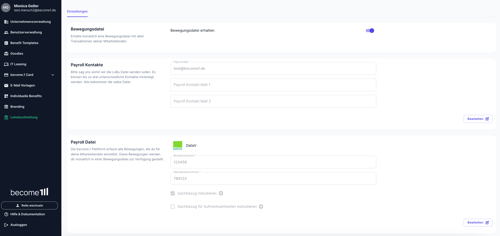
Step-by-Step Guide: How to setup your payroll information
- Select Payroll Accounting from the left menu bar.
- If you manage multiple companies, select the company for which you want to store the data in the top right corner.
- If you want to receive a variable data file, turn on the toggle switch.
- In the Payroll Contact field, enter the email address(es) where the monthly payroll data should be sent.
- Under Select payroll program, click Change and select your payroll software.
- If required, enter the Consultant number (Beraternummer) and Client number (Mandantennummer).
- Specify whether you want to include the tax-free benefit (Sachbezug).
- Finally, click Save.
Additional information and tips
Important: The decision to include the tax-free benefit (Sachbezug) in your payroll accounting rests with your tax advisor or yourself. Our detailed invoicing, featuring transparent employee numbers and cost centers, ensures a clear process in compliance with § 4 LStDV. This allows you to benefit from simplified handling and potentially avoid corrections.
TIP: If you select DATEV as your payroll program, the contact specified under "Payroll Contact" will automatically receive information regarding the wage types (Lohnarten) and an initialization file, if required. If you already use other wage types, feel free to let us know via customer-success@become1.de so we can store them accordingly.
Still have questions? The guide wasn't enough or you're experiencing a special case? Just send us a message at support@become1.de or write to us in the chat. We are happy to help and usually get back to you within 48 hours on business days.